
A clean forex calculator can save your brokerage a world of headaches. When clients swear their P/L is wrong because of fees, swaps, or a little slip in execution that didn’t get counted, a transparent calculator is what keeps those conversations from turning into disputes.
I’ve watched support chats blow up over a tiny mismatch—five bucks here, ten there—because nobody can reconcile what the trading screen shows vs. what the back office booked. If the calculator can’t “show the math” clearly, even when tax and coupon line items are missing, nobody believes the total.
At Fxbee, one engineer put it bluntly: “If you can’t show the math, you can’t win the argument.”
This intro sets you up to calculate gain or loss the same way a brokerage-grade system does—using the same inputs and the same conventions, including all the costs that bite—spread, commission, overnight swap, and slippage.
By the end, you’ll know what inputs to standardize, what to explain in the UI, what to hand over to compliance, what to hand to clients, and how to stop P/L disputes from eating your day.
Can a forex calculator handle spreads, commissions, and slippage?
All-in P/L formula: Bid-Ask Spread, commissions, and Execution Speed
The basic P/L math in spot FX is simple in theory:
P/L in account currency ≈ (Exit price – Entry price) × pip value × number of lots
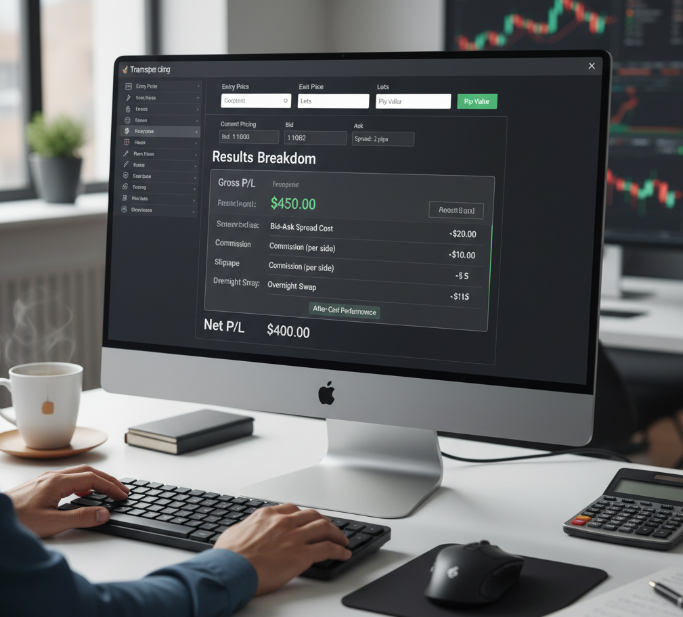
In practice, brokers and liquidity venues layer several costs into that:
Bid-Ask Spread – the difference between the bid and ask at the time of execution.
Trading commissions – per-lot or percentage fee per round turn.
Execution slippage – when the fill price differs from the requested price due to latency or liquidity.
Overnight swaps / financing – carry from holding positions past rollover.
A good forex calculator should:
Start with Bid price/Ask price: spread eats pips right away.
Show gross P/L (price move only) vs net P/L (after fees).
Include commission per side, per lot, or per $ million notional.
Log slippage as part of the calculation, not as a mystery “adjustment”.
A solid forex calculator shows “gross move” and “after-cost” side by side so your clients can see exactly how the spread and fees impacted their final result.
For wholesale buyers: insist on editable spreads and commission rules per symbol, or your clients will say “your math is off” any time your liquidity changes.
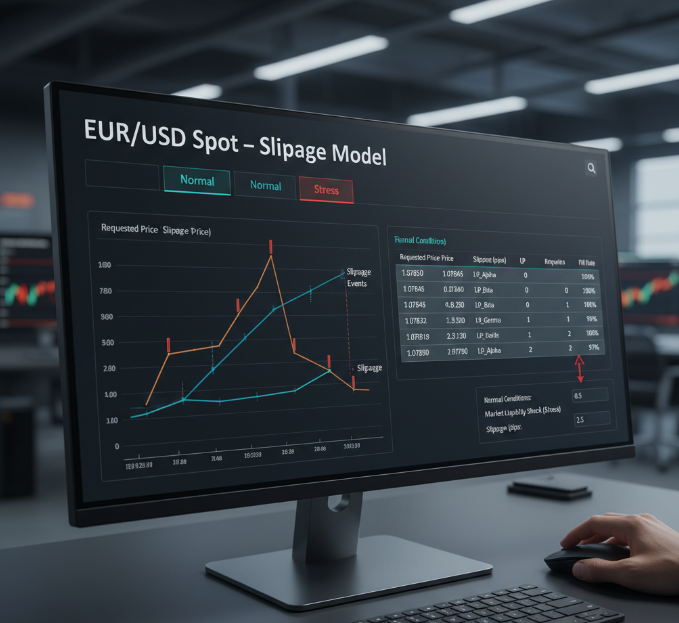
Slippage modeling under Market Liquidity shocks for EUR/USD spot trades
When volatility spikes, the order book thins and market depth drops—EUR/USD can still bite, even though it’s one of the most liquid pairs.
Track execution price vs requested price.
Log requotes and fill rate.
Tag the liquidity provider used.
Quick win: set “normal” and “stress” slippage presets in the calculator so sales and support aren’t arguing over one “true” number. For backtesting and reporting, you can show what the P/L would have been under both assumptions and let risk or product decide what becomes the “official” policy.
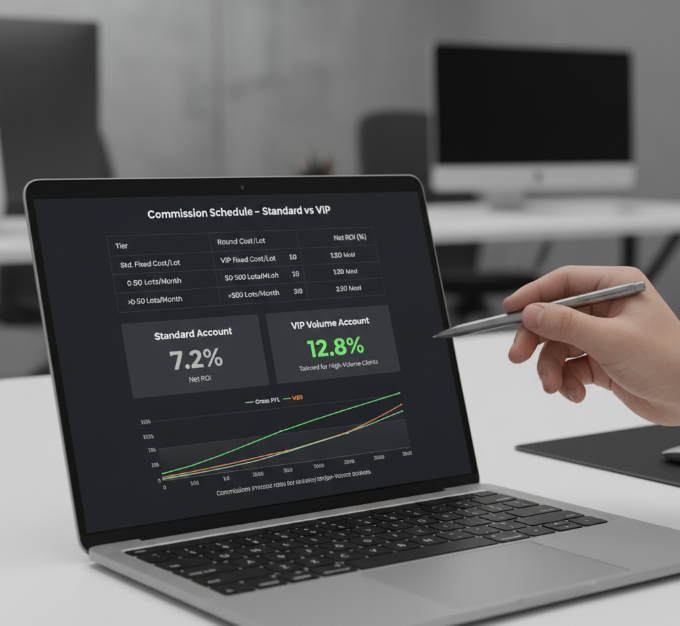
Commission schedules and how they change Percentage Change in net returns
Confirm the fee structure: fixed commission or tiered.
Tie it to lot size and round turn cost (open + close).
Show net ROI on the trading account after fees.
Add a brokerage pricing toggle: “standard” vs “VIP volume.”
This is where buyers care: one wrong commission model can flatten a strategy’s percentage return enough to trigger angry emails from high-frequency or high-volume clients. A calculator that can replay profit/loss under different fee tiers becomes a powerful sales and retention tool.
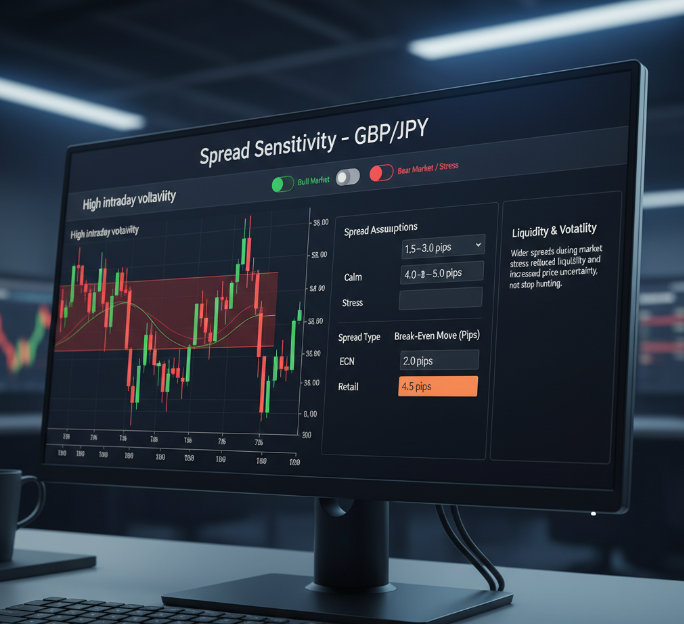
Spread sensitivity test: GBP/JPY under Bull Market and Bear Market conditions
GBP/JPY is a “spicy” pair—spreads widen in stress, and intraday volatility can be brutal. A calculator that lets you:
Plug in different spreads by time-of-day or volatility regime.
Compare tight ECN-style spreads vs “all-in” retail-style spreads.
Show the break-even move required to cover costs.
…makes it much easier to justify spread changes to clients. If traders can see that a 3.0 pip spread in calm conditions vs 5.0 pips in stress is still fair given the liquidity, it reduces the “you widened spreads to hunt stops” accusations.
Overnight swap costs: estimate profit with a forex calculator
Overnight financing (swap) is where even advanced clients get confused. The calculator must:
Distinguish long vs short swap (you may earn or pay).
Handle triple-swap days (usually Wednesday) correctly.
Clarify basis points vs percentage per annum on the notional.
Holding a long position or short position overnight can add or subtract a surprising amount from a trade’s bottom line; traders often swear the platform “stole” money—when it’s just financing math.
On Wednesday rollover, a lot of accounts get hit with triple swaps to cover the weekend. The calculator should show:
Swap per day
Swap for the current holding period
Swap impact on equity and margin
This makes it dramatically easier for brokers to cut support tickets like “my equity dipped for no reason.”
A forex calculator that shows pip value + swap together on USD/CAD, USD/CHF and other pairs helps clients understand that even if the price barely moved, financing might still shift their P/L noticeably.
Forex calculator inputs: pair, lot, pip value
If inputs are inconsistent, the outputs will never match statements, back office, or liquidity provider reports. At minimum, a professional-grade calculator needs:
Currency pair (e.g., EUR/USD, USD/JPY, GBP/JPY)
Lot size or units
Entry and exit price
Pip value (per lot)
Account currency
Leverage and margin requirement
Get these wrong and traders will swear your platform miscalculated—even when it’s doing exactly what the feed and the rules say.
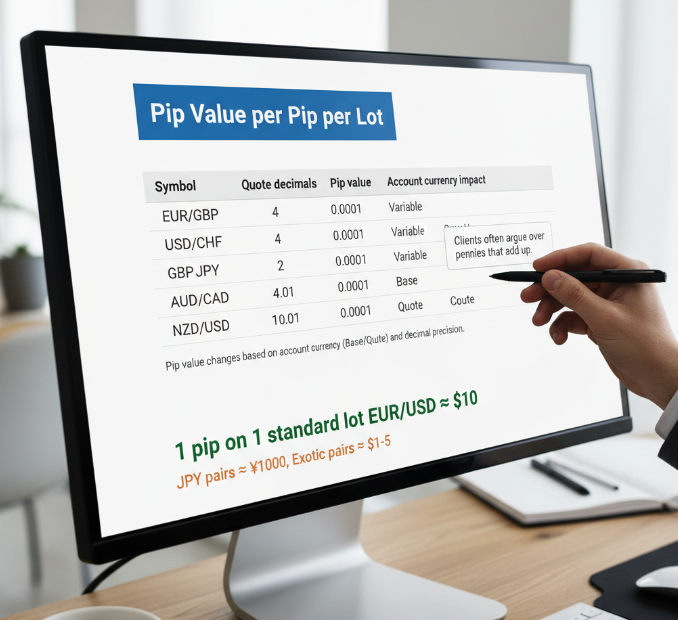
Pip Value differences across EUR/GBP and USD/CHF quote formats
EUR/GBP and USD/CHF trip people up because pip value depends on whether your account is in the base or the quote currency and how many decimal places the quote uses. A good calculator sets a clear “per pip per lot” table per symbol so clients stop arguing over pennies that add up.
Pip value: bigger swings make “small” spread changes feel huge. A one-pip move on a standard lot of EUR/USD is usually about $10; on exotic or JPY pairs, the value in your account currency can differ significantly.
Position Size and Leverage: linking Margin Requirement to Account Balance
Start with account balance and current equity.
Choose position sizing (lots/units).
Apply leverage ratio to get Margin Requirement.
Track used margin and free margin live.
If free margin gets thin, warn early: “You’re close to a margin call.”
This is where forex calculator tools cut support load—clients see margin pressure before it bites.
Exchange Rate precision: pricing decimals and rounding risk in calculators
Tiny pipettes and fractional pips can cause a sneaky mismatch if the price feed and your tool disagree on decimal places.
| Pair | Decimal places | Fractional pips (pipettes) | Typical rounding risk |
|---|---|---|---|
| EUR/USD | 5 | 1/10 pip | Medium |
| USD/CHF | 5 | 1/10 pip | Medium |
| GBP/JPY | 3 | 1/10 pip | High |
If the feed quotes EUR/USD at 1.12345 but the calculator rounds differently, you can get a few cents difference on each trade. Over thousands of trades, that adds up to support tickets and reconciliation headaches.
Set the take profit with a clean template: stop size → monetary risk → take-profit distance → projected reward. This is the kind of feature that quietly sells well to broker partners—less guessing, more consistency.
Multi-asset support: Spot Contracts, Options, and Currency Futures inputs
A broker-grade forex calculator can’t stop at spot forex. Clients often trade:
Spot FX
FX CFDs
Currency futures
FX options
Each has different contract specs and P/L behaviour. If the calculator can adapt the same core engine to these instruments, your brokerage can cover more of the product shelf without messy add-ons.
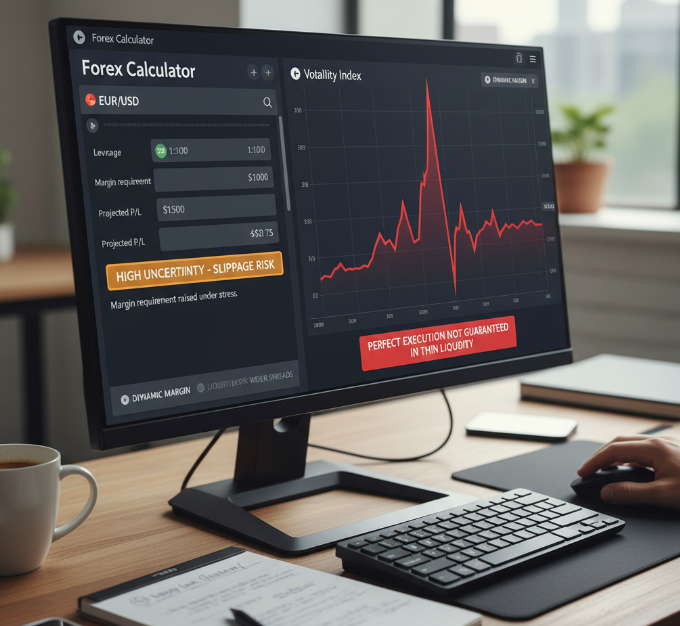
Volatility Index overlays: dynamic margin and risk warnings for liquidity drops
When VIX pops, liquidity can vanish, spreads jump, and markets gap. A calculator that:
Raises margin requirement under stress,
Flags slippage risk,
And highlights “high uncertainty”,
helps clients stop assuming perfect execution. If the tool can’t flag slippage and margin jumps, it’s not brokerage-ready.
Pip method vs forex calculator: which is more accurate?
Some traders still scribble P/L on paper using the raw pip method:
(Number of pips) × (pip value per lot) × (number of lots)
This works if:
Pip value is fixed,
The account currency equals the quote currency,
And fees are negligible.
But in real life, pip value changes by currency pair, and your profit/loss can be in EUR while the account is in USD or GBP. A calculator that automatically converts into the account currency using the most recent rate mirrors how serious brokers do it.
In short:
Manual pip math is fine as a rough check.
A well-built calculator is what traders and compliance will use to settle real-money questions.
Confused by pips? Use a forex calculator to convert instantly
Pips, fractional pips, and odd lot sizes confuse even experienced traders when they jump between brokers or platforms.
A brokerage-grade forex calculator should answer two questions at the same time:
What’s my position size in base currency units?
What’s my profit/loss if price moves X pips?
It should also make it easy to see:
How much margin gets tied up for this position size at current leverage?
How much free margin remains after opening or closing the trade?
If it only shows P/L and hides margin, clients blow up accounts thinking “I’m fine, it’s only 20 pips” when in reality they’re one swing away from a margin call.
Feature Q&A: what Fxbee folks say (the “procurement” angle)
Q: What’s the #1 thing wholesale buyers ask for?
Maya R., Fxbee Product Manager: “Consistency. The same pip value, the same rounding—so client P/L lines up with brokerage statements.”
Q: What triggers the most support tickets?
Eli K., Fxbee Trading Systems Engineer: “People mixing up leverage and margin. A calculator that shows pip value and margin side-by-side cuts those tickets fast.”
Q: What’s a simple trust signal in the UI?
Jordan S., Fxbee Engineering Lead: “Show base currency, quote currency, and the exact rate used for conversion. When numbers look ‘off,’ clients can see why.”
A quick “sanity check” before you trust any output
Before you roll your calculator out to clients or partners:
Compare its results with at least one independent forex profit calculator from a reputable broker or analytics provider.
Make sure the formula matches standard industry practice:
P/L = (Exit – Entry) × pip value × lot size × number of lots, plus or minus all costs.Test it on:
Major pairs (EUR/USD, GBP/USD)
JPY pairs (USD/JPY, GBP/JPY)
Exotics where pip value and conversion are trickiest
Check margin requirement handling against your risk rules, especially when leverage changes or volatility spikes.
If your calculator matches external tools within a few cents after rounding, and it aligns with your internal risk and pricing policies, you’re in good shape.
Conclusion
Net forex gain or loss isn’t just “price went up.” It’s like checking a restaurant bill: you don’t just care about the entrée price; you need to see tax, service fee, and tip before you’re satisfied the total is right. In FX, those add-ons are spread, commission, swaps, and slippage.
Get the math right, show it clearly, and support tickets drop fast.
Here’s the no-drama checklist a brokerage-grade forex calculator should cover:
Net P/L after bid-ask spread, commissions, and slippage
Swap/rollover shown clearly, including triple-swap days
Correct inputs for pair, lot size, pip value, and margin
A receipt-style log: rate timestamps, rounding rules, and fill details
Quick sanity checks across liquid and thin markets
Wrap it up by standardizing inputs across major pairs like EUR/USD, GBP/USD, USD/JPY and your main exotics. Once your team stops second-guessing the numbers, reps stop firefighting, and the product sells itself.
FAQ
How does a forex calculator handle spreads, commissions, and slippage?
Adds the Bid-Ask Spread to your entry/exit Exchange Rate.
Applies commissions (per lot or tiered) to show net P/L.
Accounts for Slippage when Market Liquidity is thin or Execution Speed lags.
Quick check: run EUR/USD in calm hours and during news.
Why does my P/L differ from the brokerage statement?
Most gaps come from changing Bid-Ask Spread, commissions, rounding on the Exchange Rate, or surprise Slippage in low Market Liquidity. Overnight swap tied to Interest Rates can also move the number.
What inputs matter most in a forex calculator for accurate P/L?
Currency Pair (EUR/USD, USD/CHF, GBP/JPY) sets pip rules and decimals.
Lot Size, Position Size, Pip Value drive cash per pip.
Leverage, Margin Requirement, Account Balance gate what you can place.
Stop Loss Distance and Take Profit Level keep risk honest.
How do I calculate pip value for EUR/GBP or USD/CAD?
Pip Value changes with quote format and your Lot Size/Position Size. EUR/GBP and USD/CAD can land different cash-per-pip because the quote currency and Exchange Rate conversion aren’t the same.
What’s the clean way to model overnight swap in a forex calculator?
Use broker swap tables based on Interest Rates and Central Bank Policy.
Show triple-swap days and product rules (Spot, Forward Contracts, Contracts for Difference).
Track impact on Account Balance and Drawdown Calculation.
Test on USD/CAD and NZD/USD over several rollovers.
How do spreads change my break-even point?
A wider Bid-Ask Spread means price must move farther before you see green. This pops up in GBP/JPY during a Bear Market or thin sessions, and it should shape Stop Loss Distance and Take Profit Level.
How can brokerages reduce disputes using a forex calculator?
Show a receipt: fill price, Exchange Rate timestamp, rounding, fees.
Report net P/L after spread, commissions, swap, and Slippage.
Add toggles for Market Liquidity and Execution Speed scenarios.
Export logs for audits and reconciliation.
Does product type change gain/loss math (Spot, Futures, Options, CFDs)?
Yes. Spot Contracts track pip moves plus costs; Currency Futures use contract multipliers; Options hinge on premium and payoff; Contracts for Difference often add financing. All still follow the Exchange Rate.
Pip math or forex calculator—which is better for accuracy audits?
Manual pip math often misses shifting spreads and real Slippage.
A calculator can log assumptions and match fills with timestamps.
It handles changing Position Size and Compounding Interest effects.
Handy for EUR/USD scalps and USD/CHF spikes.
How do I size trades using risk-to-reward without blowing up margin?
Set risk with Risk-to-Reward Ratio and Stop Loss Distance, then back into Position Size. Confirm Margin Requirement fits your Account Balance at your Leverage. A rising Volatility Index calls for extra cushion.