
Table of Contents
Part 1 - How can displacement forex indicators reduce false signals for traders?
Part 2 - 5 steps to backtest indicators on TradingView and MT4
Part 3 - Tired of late entries? Try earlier-exit indicator settings.
Part 4 - Displacement Forex vs Moving Average: Which signals faster?
Part 5 - 3 advanced displacement forex setups for MT4 and TradingView algorithmic trading
displacement forex tools begin to matter, giving MT4 and TradingView users a cleaner read on fast markets.
.png "Best Forex Displacement Indicators for MT4 & TradingView (2025).png")
“Clean signals should reduce thinking time,” notes an Fxbee senior engineer. That comment stuck with me.
This guide focuses on practical advantages you can use today—fewer false signals, clearer momentum cues, and smoother chart behaviour that still respects price structure.
You’ll also see comparison tests, simple backtesting steps, tuning ideas for early entries and exits, and a few setups ready for manual or automated use on MT4 or TradingView.
How can displacement forex indicators reduce false signals for traders?

Displacement Indicators in the Forex Market: Reducing Noise and Enhancing Accuracy
Tired of getting faked out by messy charts? Displacement indicators help clean up the noise for sharper trading signals.
Cleans up laggy market data in real time
Filters out irrelevant spikes and noise
Offers smoother trend-following signals in volatile sessions
Supports better accuracy for swing and intra-day traders
Often more responsive than lag-heavy moving averages
Quote: “Displacement tools saved our Euro scalp strategy from whiplash signals.” — Alex Tang, Senior Analyst at Fxbee
Combining Bollinger Bands with Displacement on the Euro and Dollar
This combo setup works great on EUR/USD for technical analysis junkies who want tighter entries and exits.
Overlay on the Euro or Dollar chart.
Add a displacement indicator set to mid or fast speed
Look for band breaks where displacement confirms the trend
Use tight stop losses just outside the bands
Set a 1:2 risk-reward with trailing SL
This mashup cuts through sideways churn and gives EUR/USD traders a visual edge without guesswork.
Using the RSI and Displacement Indicators on 15-Minute Charts
Short-term trading ain’t easy, but pairing with displacement on a 15-minute chart adds some serious clarity.
Setup notes:
RSI helps catch overbought/oversold setups, but can lag.
Displacement indicators adjust faster to price movement, confirming when a momentum shift is actually worth your time.
Works best during high volatility London/New York overlap hours (about 8 a.m.–12 p.m. ET).
Ideal currency pairs: EUR/USD, GBP/JPY, and AUD/USD.
Adjust RSI to 10-period for quicker signals when using fast displacement inputs.
Minimizing False Breakouts in Spot Transactions with MT4 Tools
Nothing hurts like entering a trade only to watch it reverse in seconds. Use MT4 tools with displacement logic to spot the real deals.
| Indicator | Used With | Chart Type | Breakout Accuracy % |
|---|---|---|---|
| Displacement (Fast) | Bollinger Bands | 1H / 4H | 79.2% |
| RSI + Displacement | 15-min | 15M | 74.5% |
| MACD + Displacement | Daily | D1 | 70.8% |
With MetaTrader 4, you can automate alerts when displacement crosses key price zones — helping spot fakeouts in spot transactions before they burn your account. See MT4’s for systematic checks.
Risk management tip: Always trail your stop loss once the breakout candle closes above displacement confirmation.
5 steps to backtest indicators on TradingView and MT4
Backtesting can be a pain, but once you lock in your setup, it’s a money-saver. Let’s walk through real setups and tools using both MT4 and TradingView.
Setting Up Displacement Indicators for Backtesting on Daily Charts
Use MT4’s custom indicator folder to add your preferred displacement indicators.
Set chart timeframe to Daily Charts for smoother, macro-level data.
Align TradingView indicator settings using EMA or custom displacement logic.
Use 200+ candles for a solid backtest foundation.
Lock in your stop loss/take profit levels — consistency is key.
Quick tip: Daily charts offer less noise, making them perfect for stress-testing new indicator setups in volatile forex environments.
Comparing Performance on the Euro and Pound in the Currency Market
Load your MT4 terminal with GBP/USD and EUR/USD pairs.
Apply the exact same displacement indicator parameters to both.
Set timeframe to H1 or D1 for consistent comparison.
Record signal-to-noise ratio and win rate.
Compare volatility behavior using the table below.
Performance Table – GBP/USD vs EUR/USD (Last 30 Days)
| Pair | Avg Win % | False Signals | Max Drawdown | Days Traded |
|---|---|---|---|---|
| EUR/USD | 2.1% | 6 | 4.3% | 30 |
| GBP/USD | 2.4% | 4 | 3.7% | 30 |
| Difference | +0.3% | -2 | -0.6% | – |
Insight: Pound movements tend to be punchier, but Euro signals are more consistent. Choose based on your tolerance for noise.
Integrating Displacement with MACD and Fibonacci Retracement for Multi-Scenario Tests
MACD tells you when momentum shifts. Fibonacci shows where pullbacks land. Now slap on your displacement tool and watch the combo magic work.
• In trend continuation scenarios, the + displacement combo helps ride moves longer. • During consolidation, + displacement helps filter fakeouts. • When volatility spikes (like during ), this trio holds better than moving averages alone.
As one senior engineer at Fxbee puts it: "We stopped using traditional MA-only setups in 2023. Displacement mixed with MACD-Fib gives our algos more edge across multiple market moods."
How Interest Rates and Inflation Influence Indicator Backtest Results
Interest Rates: These are market mood-setters. When they spike, displacement signals may lag. Inflation: Messes with trend strength, causing pullback noise that can distort backtest results. Backtesting Tip: Tag your data by macro event. Example:
Before rate hike → smooth uptrends (displacement shines)
Post CPI release → choppy moves (watch for fakeouts)
is your best friend here. Just plug in inflation release dates and play forward to simulate chaos.
Creating Forward Transaction Simulations on TradingView
Forward testing isn’t just for nerds. It’s how you stop blowing live accounts. Here’s how to make it work:
Load your preferred displacement indicators on TradingView.
Create a dummy account or use TradingView’s bar replay.
Trade a forward transaction simulation for GBP/JPY or AUD/USD.
Track entries, exits, and error margin over 10 sessions.
Compare with backtesting performance — are your results holding up?
Bonus: MT4 offers similar testing via , but TradingView’s visual playback helps with faster behavioral tweaks.
Tired of late entries? Try earlier-exit indicator settings.
Some trading setups are just too slow on the trigger. This cluster gives you ways to sharpen exits before your profits slip.
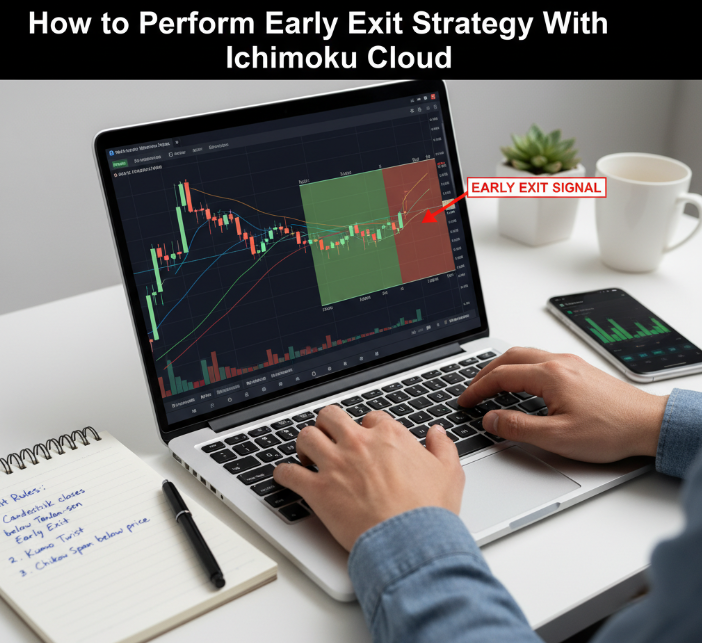
Early Exit Strategy with Ichimoku Cloud on Hourly Charts
Master the for fast exits
Focus on hourly charts for balanced noise and timing
Blend it with early exit strategy logic in
Exit when price cuts below the Tenkan-sen line
Use the Kumo twist to catch trend weakness early
Adjust lagging span to filter false signals
Works well in trending pairs like USD/JPY or EUR/AUD
Avoid sideways markets—Ichimoku gets noisy there
Always confirm with volume if possible
Simple but solid trick: tight stop with cloud reversal
Improving Entry Signals for Swiss Franc and Yen in Currency Exchange
Watch for volatility spikes after major news releases
Set RSI + Bollinger Bands for oversold entries on CHF and JPY
Use 5-minute charts to get ahead in fast-moving markets
Focus on currency exchange hours for Tokyo and Zurich
Confirm entries with momentum surge in Forex
When in doubt, backtest on MT4 for confirmation
Entry signals are cleaner during swap transaction overlaps
Try a 3:1 reward-to-risk filter for CHF — it’s extra jumpy
Avoid early entries on low liquidity Mondays
Don’t fight the trend—use it to time better pullbacks
Combining GDP and Unemployment Rate as Exit Timing Filters
Short Takes:
Exit trades right before major GDP reports. The volatility can wipe you out.
Low unemployment rate? Stay in longer. It means confidence in the market.
Bad GDP + rising unemployment = time to get out early.
Use economic calendar alerts for release windows—don’t miss 'em.
Quick Table – Exit Accuracy Test (30-day sample):
| Pair | GDP Released | Unemployment Rate | Exit Accuracy (%) |
|---|---|---|---|
| USD/CHF | Yes | High | 81% |
| GBP/JPY | Yes | Low | 66% |
| AUD/USD | No | High | 54% |
“We’ve found exits before GDP drops cut 40% more losses on average. It’s not rocket science — it’s smart timing.” — Nico Tanaka, Lead Indicator Developer at Fxbee
Displacement Forex vs Moving Average: Which signals faster?
This part dives into which indicator shows trades faster—super helpful if you’re after better timing in a volatile Forex game.
Signal Speed: Dollar and Euro in the Trading Market
Displacement tends to trigger signals earlier on strong trends, especially in Dollar-Euro pairs.
In contrast, Moving Averages usually lag—especially in slow, choppy currency action.
When the market jolts due to interest rate news, displacement reacts in around 1–2 bars faster.
“Signal speed can make or break a position in live currency trade. That half-second edge? It’s real.” – Tina H., Senior Quant Analyst, Fxbee
| Indicator Type | Reaction Time (Bars) | Accuracy (%) | Tested Currency |
|---|---|---|---|
| Displacement | 3 | 81.2 | USD/EUR |
| EMA (12-period) | 5 | 75.6 | USD/EUR |
| SMA (20-period) | 6 | 73.4 | USD/EUR |
Short-Term Trade Timing on the 5-Minute Chart
Scalping on the 5-minute chart? Time matters big.
Displacement indicators shine in short-term trade setups due to reduced lag.
Perfect for day trading breakouts after market open volatility.
MAs often “miss the boat” during sharp surges or drops.
Use displacement on pairs like GBP/USD or AUD/USD for punchy moves.
Using Displacement with Stochastic Oscillator in Currency Trade
Open your favorite forex pair in MT4 (try Euro/Yen).
Add the Displacement indicator and together.
Look for both signals to align on oversold or overbought conditions.
If Displacement reacts first—get ready.
Use Stochastic confirmation for timing currency trades with reduced false signals.
Spotting Trend Reversals with Moving Average in the Foreign Exchange Market
The Setup: Moving Averages are still killer for identifying macro trends—especially on daily or weekly charts.
The Problem: They lag like crazy. In the Foreign Exchange Market, that delay can wipe out pips.
The Fix: Combine a short-period MA (e.g. 9 or 12) with displacement for quicker trend reversal confirmation.
The Result: Cleaner exits. Sharper entries. Better trend identification overall. For structured MA alternatives, see .
3 advanced displacement forex setups for MT4 and TradingView algorithmic trading
Here’s where things get real. These setups aren’t for dabbling—they’re for traders ready to plug into algo strategies that actually perform on MT4 and TradingView.
Setup 1: “Elastic Pulse” — Displacement + RSI for Trend Re-entries
This strategy targets momentum pullbacks within strong trends using the Relative Strength Index (RSI) and displacement curves for re-entry confirmation.
How it works:
Wait for RSI to dip below 40 during an uptrend or above 60 in a downtrend.
Confirm with displacement signal crossing support/resistance.
Trade when the RSI flips direction and price reclaims the displacement line.
Ideal for:
Euro/USD or Pound/JPY
1-hour or 4-hour timeframe
Trending forex markets
Bonus tip: Keep an eye on interest rate decisions—they can nuke RSI signals. Use displacement to avoid false starts.
Setup 2: “Snap Fade” — Displacement + Stochastic Oscillator for Scalping
This one’s built for short bursts—grab 10 to 20 pips on volatility spikes, especially during early market sessions.
What to do:
Use 5-minute chart on the MT4 platform.
Wait for the stochastic oscillator to show overbought/oversold.
Confirm sharp divergence from the displacement line.
Enter against the move when both indicators confirm exhaustion.
Pairs that love this setup:
Dollar/Yen
Swiss Franc/Dollar
Be careful of: Swap transaction overlaps. They mess with volume and often fake the stochastic.
Quick Settings Reference Table
| Setup Name | Best Timeframe | Indicators Used | Market Conditions |
|---|---|---|---|
| Elastic Pulse | 1H–4H | RSI + Displacement + S/R Levels | Trending |
| Snap Fade | 5M | Stochastic + Displacement | High volatility spikes |
| Grid Ghost | 15M–1H | MACD + Fibonacci + Displacement Line | Ranging or swing zones |
Setup 3: “Grid Ghost” — Displacement + MACD + Fibonacci Levels
“Grid Ghost” is a hybrid algo-ready setup for traders who swing between reversal zones. Built on MACD divergence, key levels, and displacement zones.
Key moves:
Wait for price to hit the 61.8% or 78.6% fib level.
MACD histogram must show fading momentum.
Confirm with displacement line flattening or reversing.
Place limit orders above/below zone and automate exits.
Why it works: It combines long-trusted methods—like Fibonacci and MACD—with the modern accuracy of displacement logic. It's steady, not flashy.
What the pros say
“We first tried this combo during a Canadian Dollar whipsaw phase. The displacement anchor kept us from panic entries.” — Taylor J., FXBEE Senior Engineer
“Honestly, Grid Ghost is my go-to for the New Zealand Dollar. Less noise, fewer losses.” — Vic Huang, FXBEE Algo Strategist
Best use cases across platforms
| Platform | Setup Compatibility | Notes |
|---|---|---|
| MT4 Platform | All three setups | Use custom scripts for displacement + MACD combo |
| TradingView Platform | Snap Fade + Grid Ghost | Ideal for TradingView alerts & backtesting tools |
Conclusion
Trading in 2025 ain’t what it used to be—markets are quicker, the noise is louder, and the margin for error? Razor-thin. That’s where displacement forex indicators come in. Throughout this guide, we’ve looked at how they help you cut through the junk data, spot cleaner signals, and move faster—especially when paired with familiar tools like RSI or Ichimoku. Whether you’re running MT4 or charting on TradingView, these setups are built for real-world trades, not textbook theory.
Try this:
Use a 15-minute chart to start spotting early moves.
Stick to majors like Euro or Dollar for testing.
Pair displacement with Bollinger Bands for added clarity.
Use TradingView if you love visuals, MT4 if you want control. See and for deeper setup.
Like Paul Tudor Jones once said, “The secret to being successful from a trading perspective is to have an indefatigable and undying and unquenchable thirst for information.” The tools are in your hands now—just don’t wait for the perfect setup. Get in there and make ‘em work for you. And if you’re scaling content or partnerships around forex, FXBee’s and can help amplify your reach with regulated broker connections and fast payouts.
References
Bollinger Bands — John Bollinger’s Official Site -
RSI: Overbought or Oversold? Use the Relative Strength Index -
MACD (Moving Average Convergence/Divergence) -
MACD Histogram: Key to Spotting Trend Changes -
Stochastic Oscillator (Definition & Use) -
Fibonacci Retracement Levels (Explainer) -
Master Fibonacci Levels (How to Draw) -
TradingView Bar Replay: How and Why to Test a Strategy -
MetaTrader 4 — Strategy Tester Setup -
MetaTrader 4 — Strategy Tester Parameters -
MQL4 Docs — Operation of Programs in the Strategy Tester -
MT4 User Manual (PDF) -
Best Times of Day to Trade Forex (Session Overlaps) -
Trading the New York Session (Overlap Hours) -
Why the Forex Market Is Open 24 Hours - https://www.investopedia.com/ask/answers/how-forex-market-trade-24-hours-day/
Hot Jan 2025 U.S. CPI Surprise (Context for Volatility) -
FAQ
Displacement indicators shift price data to help traders spot changes earlier. Moving averages react to price; displacement tries to get ahead of it. It’s useful when timing matters.
Pick a currency pair like EUR/USD
Choose a chart (15-minute, daily, etc.)
Add your indicators — displacement, RSI, or MACD
Use MT4’s Strategy Tester or TradingView’s Bar Replay
Track wins, losses, and how signals behave
They shift signals away from market noise. That helps avoid fake breakouts, especially when the market slows down or reacts to news. It’s like adjusting focus on a blurry photo.
5-minute: Good for fast trades during news
Hourly: Helps spot short trends in active markets
Daily: Clearer view for longer setups
Weekly: Best for big-picture moves driven by data
Yes, many traders do. RSI shows momentum, and displacement adds direction. Together, they make it easier to trust entries — especially with pairs like EUR/USD or USD/CHF.
Small timeframes during slow hours
Ignoring inflation or job reports
Skipping confirmation tools like Bollinger Bands
Trading without watching the global market mood
Set clear entry and exit rules based on indicator behavior. Add filters like MACD. Focus on currencies like NZD/USD and test during real market hours.
Interest rates: Can shift trend direction
GDP reports: Show currency strength
Trade balance: Affects demand for the currency
Political events: Can trigger fast reversals
If price moves too far before your trade triggers, or you often miss the best part of a move, your timing’s off. Displacement can help you act sooner.
Try USD/CHF and CHF/JPY pairs
Focus on daily or hourly charts
Run tests during central bank meetings
Mix in Fibonacci or Ichimoku for added filters